Equipment catalogue

Industrial products

Genuine equipment for identification, marking and factory automation.

7 sản phẩm

      Support center

      Product catalogue

      Official PDF catalogues for MAX tube & marker printers, label printers and Toshiba inverters distributed by TOVINA — view online or download for free.

      Support center

      Technical downloads

      User manuals, software and technical documents for TOVINA customers and dealers.

      Support center

      Documentation & technical support

      Quickly find catalogues, user guides and maintenance services for your equipment.

      Trung tâm hỗ trợ

      How to use MAX label printers & wire markers

      Compiled from MAX (Japan) manuals, catalogues and official videos, and rewritten by TOVINA from our experience handing printers over to customers. For hands-on guidance at your workshop, call hotline/Zalo 0917 399 279.

      Choosing the right printer for the job

      MAX has two industrial printer ranges: Bepop CPM prints and die-cuts labels and signs in any shape; LETATWIN LM prints numbers and text on marker tubes, heat-shrink tubes and label tape to identify wires. The table below summarises the main differences.

      • For warning labels, safety signs, equipment labels and pipe markers with images and colours: choose a Bepop CPM.
      • To number wires in panels: choose a LETATWIN; for site work choose LM-550A3 or the battery version LM-550A3B, for volume production in the workshop choose LM-3000PRO.
      PrinterJobResolution / speedConsumablesConnectivity
      CPM-100HG5MPrint & cut labels and signs, CMYK colour printing400 dpi · print 25 mm/s · cut up to 120 mm/s100 mm labels (GN, NL, special labels)USB 2.0, LAN
      CPM-200GMPrint & cut large labels and signs300 dpi · print 25 mm/s · cut up to 120 mm/s100 and 200 mm labelsUSB 2.0, LAN
      LM-550A3Prints marker tubes, heat-shrink tubes, label tape, ID plates300 dpi · 40 mm/sTubes φ1,5 – 8 mm, tape 5/9/12 mmUSB 2.0, USB flash
      LM-550A3BAs LM-550A3, plus battery operation300 dpi · 40 mm/sAs LM-550A3USB 2.0, USB flash, AA batteries
      LM-550EPrints marker tubes and label tape (basic model)300 dpi · 27,5 mm/sTubes φ2,5 – 6,5 mm, tape 5/9/12 mmBuilt-in keyboard
      LM-3000PRODesktop printer for panel shops300 dpi · 80 mm/sPVC tube φ1,5 – 10, heat-shrink φ2 – 19, GRIPSLEEVE, WAGO block markers, marker stripsWi-Fi, LAN, USB

      Bepop CPM: loading the label roll and ribbon cassette

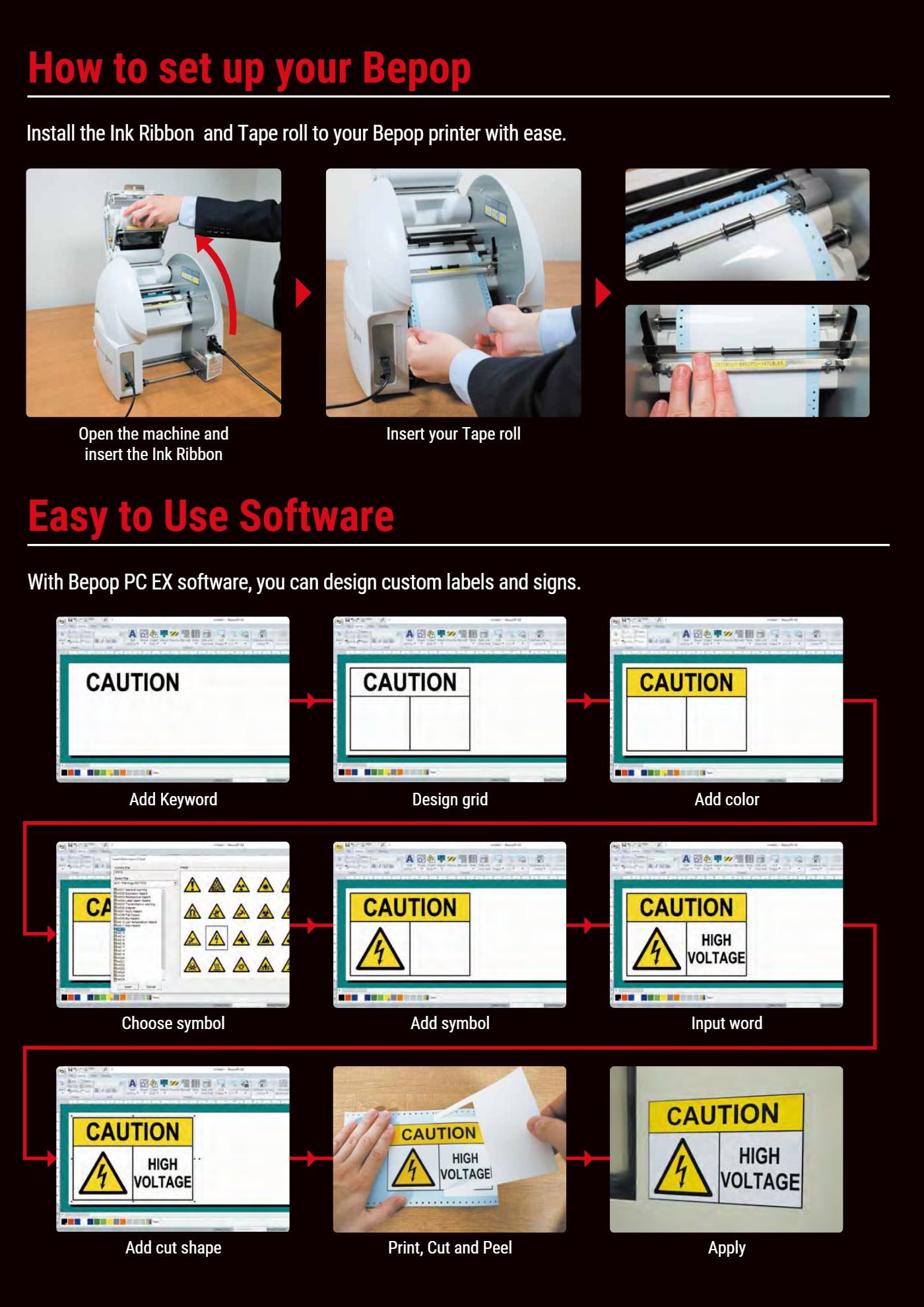
      1. Switch off and pull the lever to open the top cover.
      2. Lift the (silver) dust guard.
      3. Place the label roll on the holder, thread the label under the dust guard and through the two label rollers.
      4. Engage the holes on both label edges with the left and right sprockets, then lower the dust guard.
      5. Holding the cassette, turn the gear in the arrow direction to tension the ribbon, hook the cassette onto the cover and press until it clicks.
      6. Close the cover until it locks, switch on and print a test.
      • The CPM-100HG5M uses 100 mm SL-R1xx cassettes; the CPM-200GM uses 200 mm SL-R2xx cassettes and SL-TR2xx refills.
      • Always switch off when loading labels or changing the cutter, so the printer cannot start unexpectedly.
      • When moving the printer, remove the cutter first so the blade tip does not break.
      Loading the ribbon cassette and label roll on a MAX Bepop, and the label design steps in Bepop PC EX
      Loading consumables and the label design steps in Bepop PC EX (image: MAX catalogue).

      Designing labels in Bepop PC EX

      1. Type a heading (e.g. CAUTION), divide the label with a grid and fill background colours.
      2. Insert symbols from a library of over 1.400 symbols and templates: ISO 7010, GHS, ANSI/OSHA, directional and maintenance signs.
      3. Type the text and add a cut line (rectangle, rounded corners, oval or around the letters).
      4. Click print: the printer prints then die-cuts automatically – just peel and apply.
      • Barcodes: 12 barcode types (CODE39, CODE128, EAN-13, EAN-8, UPC-A, UPC-E, ITF, CODABAR, PDF417, MSI…) and 4 2D code types (QR, Micro QR, Data Matrix, MaxiCode).
      • Data links: connect CSV/TXT/XLSX files to batch-print asset and product labels with different serial numbers and barcodes.
      • Auto-numbering: select the number part of a string (e.g. Lot No. 9M33012), set the increment and the software duplicates the labels.
      • Wire Marking Wizard: creates wrap-around and flag labels sized to the cable diameter.
      • Product label mode: enter the size and fill in the spec table to get a machine nameplate label.
      • Mirror printing: prints reversed text for applying on the inside of glass.
      • Software and drivers are free to download from MAX; the new version has a Vietnamese interface for multilingual text.
      Bepop PC EX 2.20 basic operation – MAX
      Bepop PC EX symbol library and label templates – MAX
      Download Bepop PC EX software and drivers – MAX USA
      Creating GHS chemical labels – MAX USA
      Printing multilingual labels (including Vietnamese) – MAX USA

      Matching labels and ribbons

      Bepop printers use thermal transfer: the head heats resin ink to about 250 °C and fuses it into the vinyl label surface, so text resists solvents, cleaners and UV better than inkjet or laser print. The label colour is the background and the ribbon colour the text; one label can be printed with several ribbon colours in turn.

      • GN (Guardian Note) labels: glossy vinyl 65–70 µm, adhesion 18 N/25 mm, −40 to +80 °C, conforms to curved surfaces such as cables and pipes; medium-term outdoor use. Apply above 8 °C.
      • NL (Navigation Linker) labels: matte vinyl 100 µm, low glare, 16 colours, adhesion 11,6 N/25 mm, −20 to +50 °C; suits directional signs, 5S boards and tool boards. Apply at 15 – 25 °C.
      • Special labels: reflective SL-S141NL, white polyester SL-S153NL, gold/silver metallic fibre labels, anti-abrasion and UV overlay film (hand-cut, not fed into the printer), anti-slip floor film SL-L100 FLOOR, cut-lettering transfer film SL-S100AP.
      ApplicationsLabelRibbon
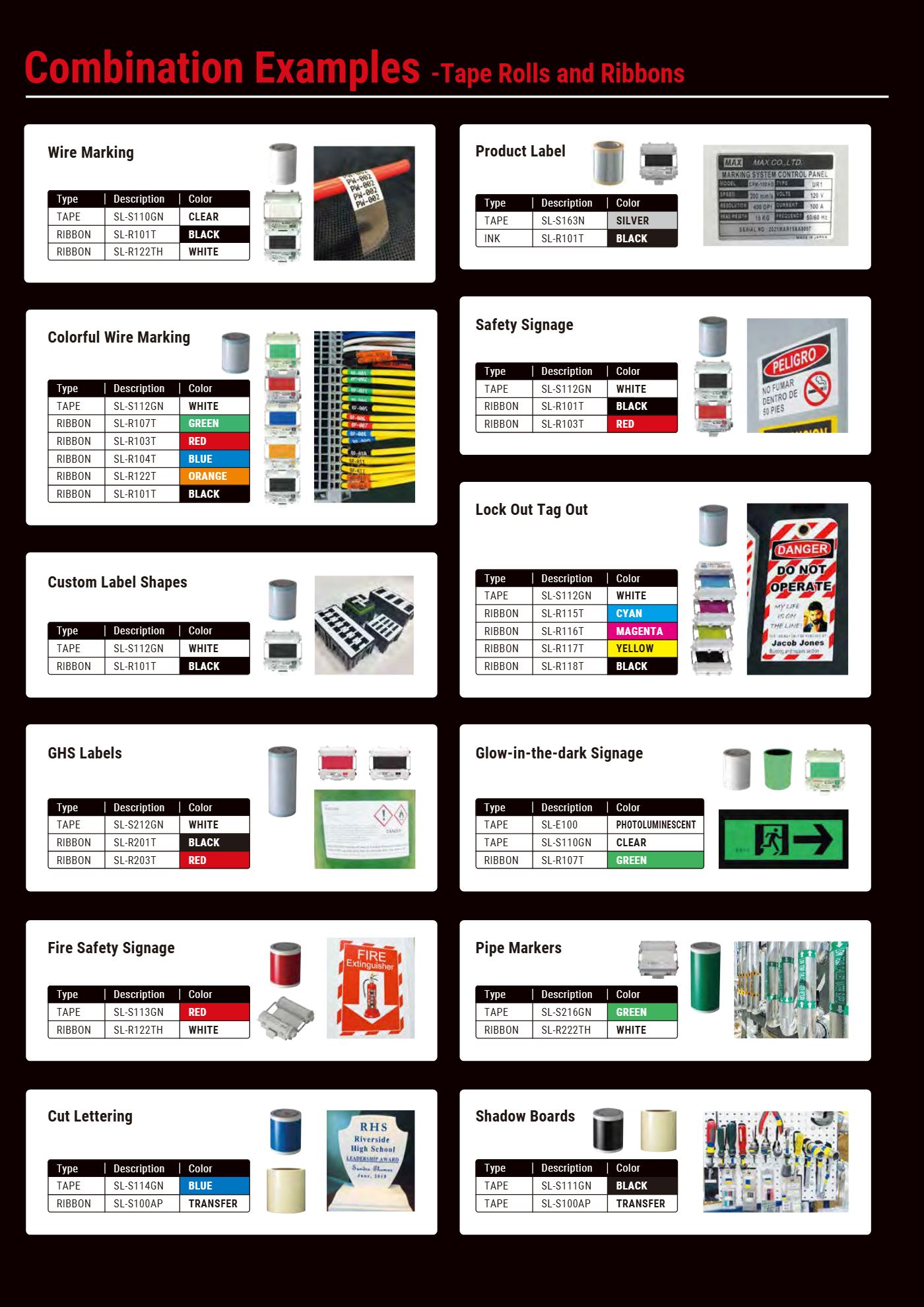
      White – red – black safety signsSL-S112GN whiteSL-R101T black + SL-R103 red
      Fire-fighting signsSL-S113GN redWhite ribbon SL-R122
      Pipe markersSL-S216GN green (200 mm)White ribbon SL-R222TH
      GHS chemical labelsWhite label 200 mmSL-R201T black + SL-R203T red
      Clear wrap-around wire labelsSL-S110GN clearBlack or white ribbon
      Metal-look nameplatesSL-S163N brushed stainlessBlack ribbon
      Glow-in-the-dark exit signsClear label + luminous sheet SL-E100Green ribbon SL-R107
      Colour images, LOTO lockout labelsWhite labelCMYK ribbon set SL-R115 – SL-R118
      Examples of matching MAX Bepop labels and ribbons by application
      Examples of label – ribbon pairing by application (image: MAX catalogue).
      Printing images with one ribbon colour – MAX USA
      Printing images with more than 2 ribbon colours – MAX USA
      Using protective overlay film on labels – MAX USA
      Fitting an SL-TR refill into the cassette – MAX USA

      LETATWIN LM-550A3: loading ribbon, tubes and label tape

      1. Load the ribbon into the LM-RC500 cassette: hold the take-up core and pull the ribbon core gently to separate the ribbon; press button B to fit the ribbon core and button A to fit the take-up core (lettered side up); turn until the ribbon shows black.
      2. Open the cover, push the (blue) head-release lever back and slide the (silver) changeover lever fully right.
      3. Thread the tube under the holder plate with 1 – 2 cm sticking out of the printer, set the tube on the TUBE label and move the changeover lever back to lock.
      4. Check the ribbon is not slack (if it is, turn the take-up core), fit the cassette, pull the head-release lever back and close the cover until it clicks.
      5. Label tape: pull out about 4 cm, thread it through the guides and fit the tape cassette; for label tape and ID plates set the cut-depth lever to TAPE, for tubes set it to TUBE.
      • φ1,5 / 2,0 mm tubes and φ2,9 / 3,7 / 4,6 mm GRIP TUBE need the attachment supplied with the printer.
      • The old LM-RC300 cassette (LM-380/390 printers) does not work in the LM-550A3; LM-IR50B, LM-IR50BP, LM-IR50W ribbons do not fit the LM-RC300 cassette either.
      • Keep 4,1 mm ID plates in a plastic bag – they attract dust by static, and dust on them can damage the print head.
      • Tubes must come off the roll easily (pull force about 200 g), untwisted and free of oil and dust.
      Loading PVC tube and the ribbon cassette – LM-550 (MAX USA)
      Loading the ribbon into the cassette – LM-550 (MAX USA)
      Loading heat-shrink tube – LM-550 (MAX USA)
      Loading the tape cassette – LM-550 (MAX USA)
      Loading ID plates – LM-550 (MAX USA)
      Loading GRIP TUBE – LM-550A3 (MAX USA)

      Choosing tube size by wire cross-section

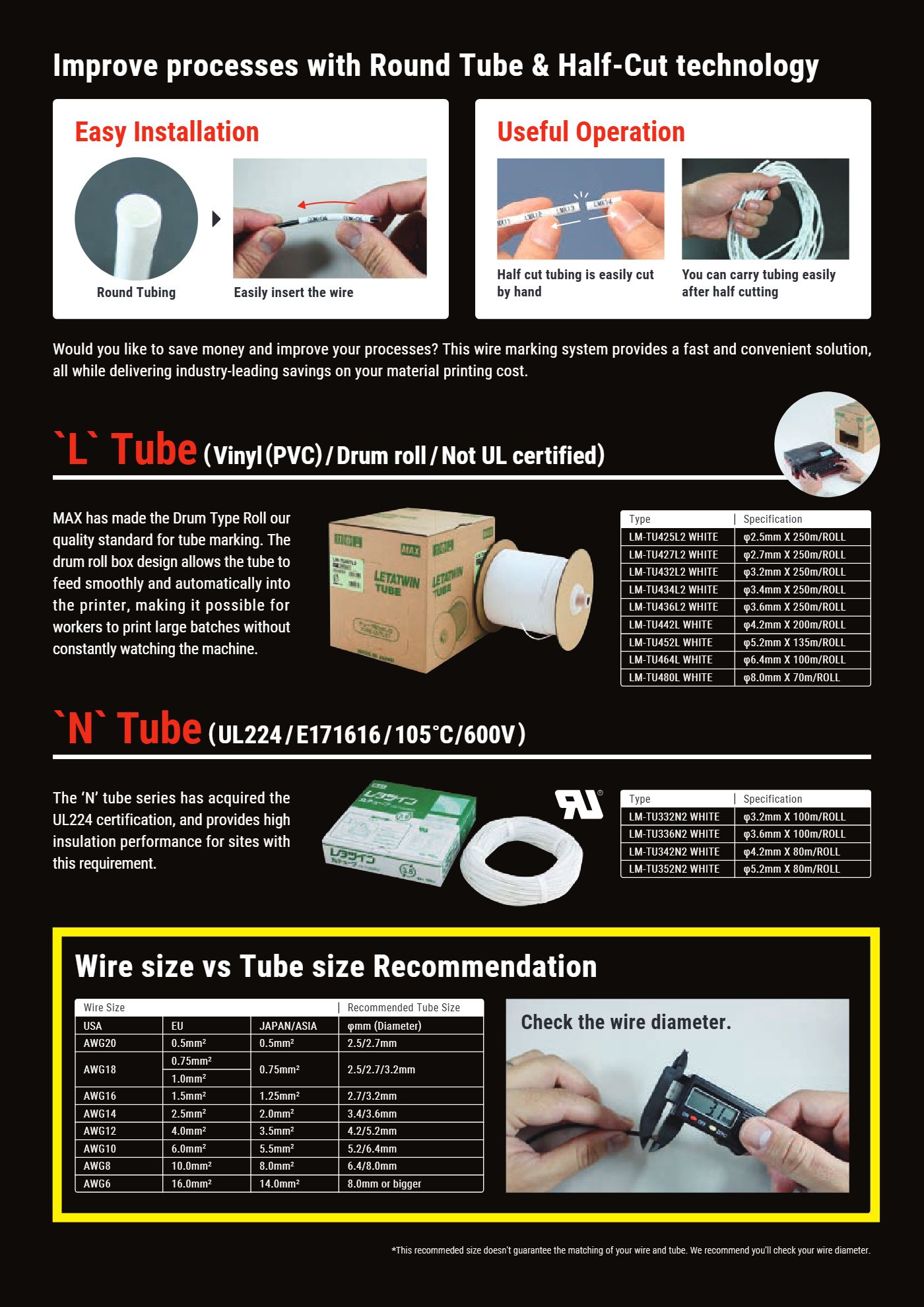
      Too tight and the tube is hard to slide on; too loose and it slips and spins. MAX's guide is below; measure the actual outer diameter of the wire with calipers before ordering tube.

      • MAX N2 tubes (LM-TU332N2 – LM-TU352N2) are UL224 certified (E171616, 105 °C, 600 V) for projects that require insulation.
      • MAX L tubes (LM-TU425L2 – LM-TU480L) are large PVC rolls in a drum box; the tube feeds evenly into the printer, so long runs need no supervision.
      • TOVINA tubes (LM-TU315N – LM-TU3100N) are designed by MAX and produced under licence by TOVINA, in every size from φ1,5 to 10 mm.
      Wire (Japan/Asia)Wire (Europe)Wire (US)Suggested tube sizeTube code
      0,5 mm²0,5 mm²AWG20φ2,5 / 2,7 mmLM-TU325N, LM-TU425L2, LM-TU427L2
      0,75 mm²0,75 – 1,0 mm²AWG18φ2,5 / 2,7 / 3,2 mmLM-TU332N, LM-TU332N2, LM-TU432L2
      1,25 mm²1,5 mm²AWG16φ2,7 / 3,2 mmLM-TU332N, LM-TU432L2
      2,0 mm²2,5 mm²AWG14φ3,4 / 3,6 mmLM-TU336N, LM-TU336N2, LM-TU434L2, LM-TU436L2
      3,5 mm²4,0 mm²AWG12φ4,2 / 5,2 mmLM-TU342N, LM-TU342N2, LM-TU442L
      5,5 mm²6,0 mm²AWG10φ5,2 / 6,4 mmLM-TU352N, LM-TU352N2, LM-TU452L, LM-TU464L
      8,0 mm²10 mm²AWG8φ6,4 / 8,0 mmLM-TU364N, LM-TU380N, LM-TU480L
      14 mm²16 mm²AWG6from φ8,0 mmLM-TU380N, LM-TU390N, LM-TU3100N
      MAX marker tube size chart by wire cross-section
      Half-cut round tube, L tube and N tube, and the tube size chart (image: MAX consumables catalogue).
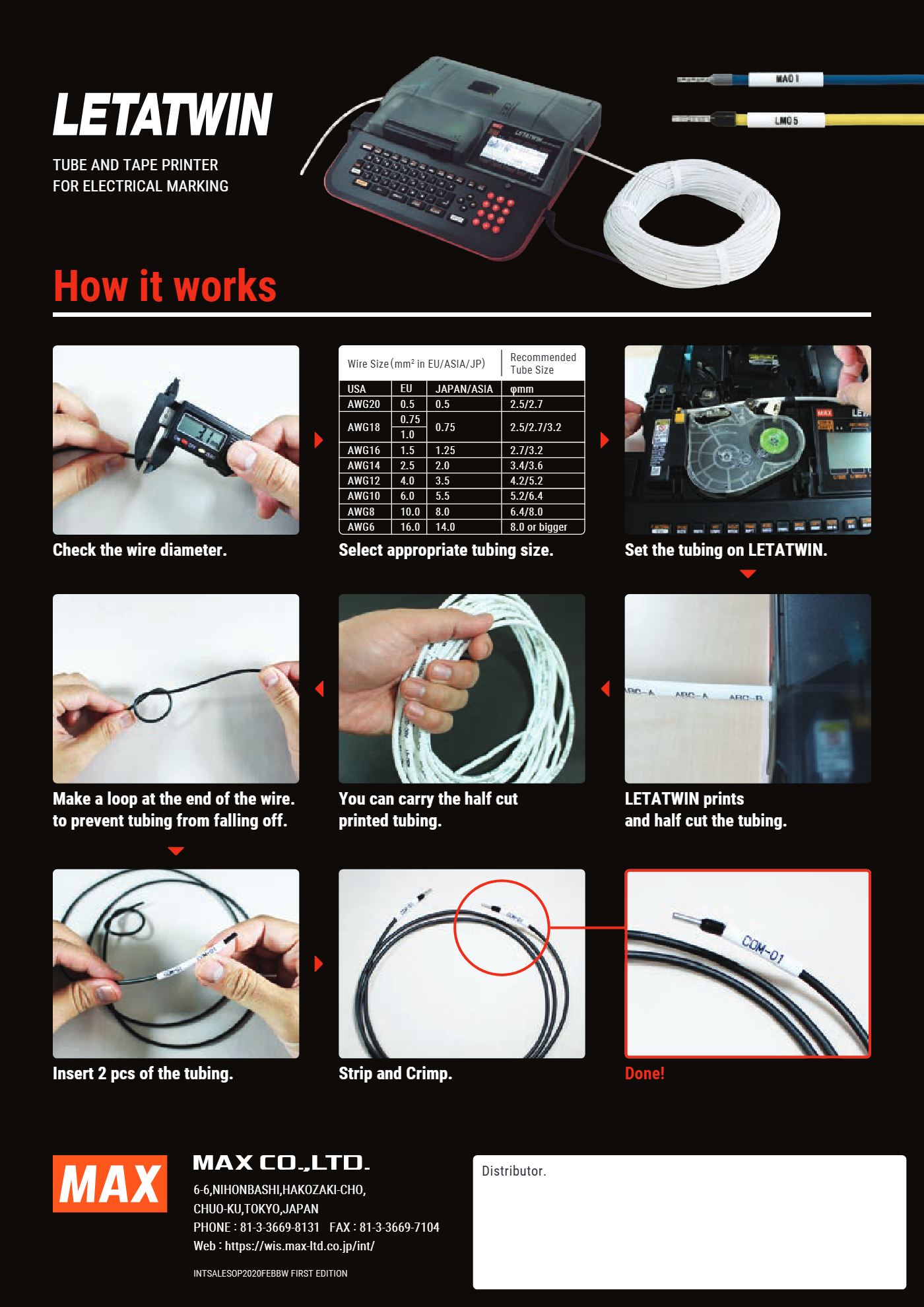
      Wire numbering workflow with a LETATWIN wire marker
      Workflow: measure the wire – choose the tube – print and half cut – slide on the tube – strip and crimp (image: MAX).

      Preparing data and frequently used print functions

      • Three number sequences in one piece: e.g. TB1-01/TB2-01, all incrementing together to the last number.
      • Auto 180° rotation: prints text both ways so it reads correctly from either end of the wire.
      • AUTO SIZE: the printer calculates character size and spacing to fit the piece.
      • Fonts: standard, bold, clear, square; electrical symbols, slashed 0, dot to distinguish 6/9.
      • USB flash: the LM-550A3 reads LMF or CSV files and stores 50 files (250.000 characters) internally.
      • LETATWIN PC EDITOR: edit on a PC, paste lists from Excel, preview and send to the printer over USB. The software manual is available in Vietnamese (see Official documents below).
      Printing workflow on the LM-550 – MAX USA
      Creating numbering data – LM-550 (MAX USA)
      Three number sequences in one piece – LM-550 (MAX USA)
      Auto 180° text rotation – LM-550 (MAX USA)
      Auto size function – LM-550 (MAX USA)
      Printing and saving data via USB – LM-550 (MAX USA)
      Using PC EDITOR software – LM-550 (MAX USA)
      Downloading drivers and software from the MAX website – MAX USA

      LM-3000PRO desktop printer

      The LM-3000PRO uses LETATWIN PC EDITOR PRO (Windows 11) and connects via Wi-Fi, LAN or USB. Each consumable has its own platen roller (tube, GRIPSLEEVE, each block marker size) and its own guide for φ1,5 / 2,0 / 8 / 10 mm tubes. See the product page LM-3000PRO for details.

      Printing workflow overview – LM-3000PRO (MAX USA)
      Loading tube – LM-3000PRO (MAX USA)
      Loading GRIPSLEEVE – LM-3000PRO (MAX USA)
      Loading polyester tape – LM-3000PRO (MAX USA)
      Loading marker strip – LM-3000PRO (MAX USA)
      Loading terminal block markers – LM-3000PRO (MAX USA)
      Loading the ribbon – LM-3000PRO (MAX USA)
      Wi-Fi connection – LM-3000PRO (MAX USA)
      Installing PC EDITOR PRO – MAX USA

      Official MAX documents

      Manuals, drivers and software published by MAX, downloaded directly from the manufacturer's site. If a link does not open, send a request and TOVINA will email it to you.

      Frequently asked questions

      Can MAX label printers print Vietnamese with diacritics?

      Yes. Bepop PC EX uses any TrueType font on the PC, so Vietnamese prints normally; the LM-550A3 and LETATWIN PC EDITOR have Vietnamese fonts.

      Are labels printed on a Bepop durable outdoors?

      GN labels withstand −40 to +80 °C and are rated for medium-term outdoor use in MAX tests. For more resistance to sun and chemicals, add a UV or anti-abrasion overlay.

      Why is tube print faint in cold weather?

      Below about 10 – 15 °C PVC tube hardens and ink adheres poorly. Turn on low-temperature mode (slower printing) or use the tube heater (LM-550A3BH, LM-3000PRO), and raise print density in the OPTION menu.

      Does TOVINA provide on-site training?

      Yes. TOVINA trains operators at handover and gives free demonstrations at the customer's workshop. Call 0917 399 279.

      Other support pages

      Trung tâm đào tạo TOVINA

      Đào tạo kỹ thuật

      Học cách vận hành, bảo trì thiết bị qua video và đề cương do kỹ thuật viên TOVINA biên soạn, sau đó làm bài test trực tuyến để kiểm tra kiến thức.

      Trung tâm đào tạo TOVINA

      Video & tài liệu đào tạo

      Video hướng dẫn và đề cương sử dụng sản phẩm, xếp theo từng dòng máy. Xem trực tiếp trên web, không cần đăng nhập.

      Trung tâm đào tạo TOVINA

      Làm bài test kỹ thuật

      Đăng ký bài test, nhận mã làm bài qua email rồi làm bài ngay trên trang này. Bài có thời gian cố định và tự nộp khi hết giờ.

      About Us

      Partnering with Vietnamese industry

      To Vi Na was founded in 2009, supplying advanced automation goods, services and solutions.

      TO VI NA CO., LTD. sends its regards to the customers who have trusted and accompanied us. We are proud to provide products and technical services specializing in Industrial Electrical Engineering, Automation, Measurement and Control.

      Development goals

        Practical experience

          Official distributor

          TOVINA is the official distributor of TOSHIBA, TMEIC and MAX (Japan) in Vietnam, with a team of Automation engineers trained both domestically and abroad.

          Company information

          TOVINA news

          Knowledge & product updates

          The latest information on wire-marking printers, label printers and industrial solutions.

          Legal

          Terms & conditions

          Website terms of use and TOVINA's transaction policy.

          TOVINA consulting

          Contact us

          Send a request and the TOVINA team will get back to you with the right equipment.

          Send a request

          Please leave your information and requirements.

          Thank you. TOVINA will contact you as soon as possible.